
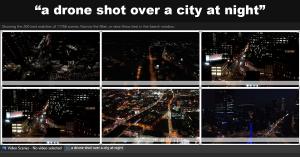
Entering "a drone shot over a city at night" makes Fast Video Cataloger present the best-matching scenes from 11,766 thumbnails, ranked by relevance. None of those clips had a drone or aerial keyword attached.
Simply describe what you see: typing "waves crashing on rocks" yields a full page of matching scenes from the entire 11,766-scene catalog, sorted with the best matches at the top, even though no one ever tagged them.

A newly introduced visual search capability locates shots within a local video library using a plain-language description, requiring no pre-existing tags or uploaded footage.
You remember what a shot looks like long before you remember what you called it. Visual search lets you look for it the way you remember it.”— Fredrik Lönn, co-founder, VideoStormSTOCKHOLM, SWEDEN, October 2, 2026 /EINPresswire.com/ — VideoStorm has brought out version 10.4 of Fast Video Cataloger, its Windows video cataloging software. The headline addition is visual search. An editor types a description of a shot, for instance "drone shot over a city at night", and the application lists the library scenes that match most closely. It examines the images themselves rather than keywords, so it uncovers footage that was never tagged at all.
Typically, locating a shot means scrubbing through hours of unlogged material or footage logged with terms different from the ones the editor now wants. With visual search, the editor describes the shot exactly as they would to a colleague. That description works alongside the other filters in the Search window, so a search can be narrowed to a single folder